Slati: Prayer companion that links worshippers with local mosques
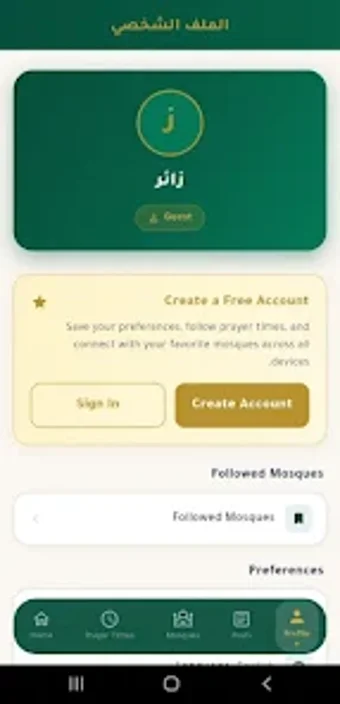
Slati, by guerchouhr, is a personal companion for the global Muslim community, designed to coordinate daily prayer and local mosque engagement. The app supplies location-based prayer schedules, an integrated Hijri calendar, and mosque discovery tools to help users maintain regular Salah whether at home or traveling. Key elements include cross-device sync via Google and Apple sign-in, an Arabic-friendly interface, and a mosque announcement board aimed at worshippers, travelers, and mosque leaders.
How Slati fits into a daily prayer routine
Slati provides precise prayer times tied to your geographic position, which helps users plan prayer windows when routines shift during travel or seasonal changes. The integrated Hijri calendar places religious dates on the same timeline, making it practical to check upcoming observances alongside daily timings. For someone scheduling their day around Salah, the app centralizes those time markers so planning and punctuality are simpler to maintain.
How the app connects worshippers and mosque communities
Slati is built around direct mosque-to-user communication: imams and mosque administrators can post khutbahs, events, and announcements to a community board that followers can open from within the app. The interactive mosque locator pairs map views with site-specific schedules so users can find nearby places of worship and see each mosque’s listed times and posts before visiting. This design emphasizes local community updates rather than generic region-wide feeds.
What platforms and accounts it integrates with
The app is available primarily on Android and shows compatibility with iOS and iPadOS, making it usable across common mobile setups. Slati supports secure sign-in via Google and Apple accounts for cross-device data syncing, which helps preserve preferences and mosque follows when a user moves between phones or tablets. Installation is standard from the mobile store environment for those platforms.
Whether the interface and privacy suit diverse users
The interface is described as clean and Arabic-friendly, which benefits users who read Arabic script or prefer localized layouts. On privacy, the app offers secure sign-in methods rather than anonymous access, and syncing uses those authenticated accounts to keep settings in sync. For mosque administrators, the same account paths enable posting and managing announcements from different devices.
To sum up, who should use Slati
Slati is a practical option for daily worshippers and mosque administrators who want a single place to track prayer schedules and local community news; its usefulness depends on mosque participation and accurate location data in a given area. For best results, enable device sync and push alerts so local announcements and timing adjustments appear promptly on your phone.